

Winipcfg 1.0
Review your current TCP/IP network protocol settings
Program info
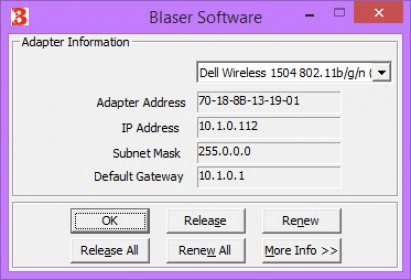
The Blaser Software Winipcfg utility is used to review your current TCP/IP network protocol settings. This can be useful when you are troubleshooting problems, such as problems connecting to your Internet provider.
If your IP address was dynamically allocated by a Dynamic Host Configuration Protocol (DHCP) server, you can use the Release and Renew buttons to release and renew the IP address.
The following sections describe the settings displayed by the Winipcfg tool.
- Adapter Address:
This string of hexadecimal numbers represents the hard-coded identification number assigned to the network adapter when it was manufactured (MAC address)
- IP Address:
This is the actual IP networking address that the computer is set to. It is either dynamically assigned to the computer upon connection to the network, or a static value that is manually entered in TCP/IP properties.
Details
Extensions

No information available
The data will be available later.Old versions

No information available
The data will be available later.Awards

There are no awards
Over time, app awards will appear here.


Comments